Posts

Showing posts with the label Google Docs

How do I change margins in a Google Doc

Image
How do I change margins in a Google Doc? via GIPHY I was asked recently how can someone change the margin settings in a Google Doc. This video shows you how to access the Page Settings of a Doc. You will find margin settings, page orientation, page size, and page color in the Page Settings section. How do I change margins for a Google Doc? I was asked recently how can someone change the margin settings in a Google Doc. This video shows you how to access the Page Settings of a Doc. You will find margin settings, page orientation, page size, and page color in the Page Settings section. Date: November 5, 2022 Author: Travis True Source: Tango 1. Open a Google Doc Tip: You can type docs.new into your Chrome browser and a new Google Doc will be created. 2. Click on File 3. Click on Page setup 4. Margin settings are found on the right side of the window. 5. You can also change the page orientation of the doc 6. You can change Paper Size and Page Color of the do...

Publishing Google Docs, Slides, and Spreadsheets

Image
Have you created a Google Doc and needed to share it publicly (i.e. with parents) but didn't want to enter all the parent emails into the doc for them to view. Did you know you can publish a Doc, Slide presentation, or Spreadsheet to the web and then share the published link with people outside of your school for them to view? Students can also use the "Publish to the web" setting to create very basic websites using Google Docs. The nice thing about the "Publish to the web" setting is once the document is published, any changes to the document will automatically update to the published version without the need of resharing the published link. This can be used in Google Slides with a presentation or an interactive presentation. Also, data in a spreadsheet can be displayed, updated as needed, and published to the web for others to view without sharing the spreadsheet or document.

Quickly Create Google Docs, Spreadsheets, Presentations, and Forms

Image
Did you know, you can quickly create Google Docs, Spreadsheets, Presentations, and Forms without going to Google Drive.  Instead of going to Google Drive, clicking New, and choosing the type of file you want to create, go to your Omni bar (address bar) and type in the type of the file with .new at the end. Type these shortcuts into the Omni bar (address bar) and press enter on your keyboard, a new file will be created and saved into your Google Drive folder. If you want to create a new Google Doc type docs.new  If you want to create a new Google Sheet type sheets.new If you want to create a new Google Slide type slides.new If you want to create a new Google Form type forms.new @travistrue Quickly create new Google Docs, presentations, spreadsheets, and forms ##TechTok ##MicroPD ♬ original sound - Travis True

Columns in Google Doc!!!

Image
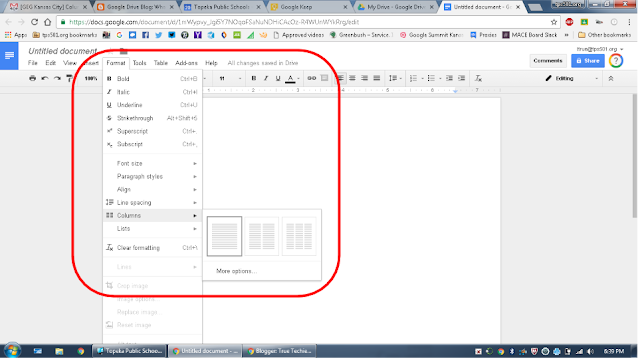
You can now format a Google Doc with 1, 2 or 3 columns . This is a much awaited feature that has been missing from Doc since it's release. You will find the setting under the Format file menu.  There are also Column options if you click on More Option in the Column pop-out. 

Google Docs - Publish a doc as a webpage

Image
A really cool feature of Google Docs is the ability to publish a Google Doc as a webpage. Also, when changes are made to the doc, those changes are reflected on the webpage. This is an easy way for teachers to have students create simple webpages with links and images, so they can share / present information. The video below show you how to publish a Google Doc as a webpage: >center>

Using AutoCrat to create certificates

Image
Autocrat is a addon for Google Sheets . This addons allows you to take data from a Google Sheet and populate a Google Doc template. The template could be a form letter or a certificate. The video below shows you how to run Autocrat manually and how the Autocrat job will run automatically if you are using a Google Form to collect the data. I used this video to help me create my certificate, specifically add the boarder around the edge of the document.

Google Docs: Inserting Clip art into a Doc

Image
One of the huge features that Google Docs doesn't have vs. Word is a built in Clip art Gallery. In recent updates to Word, Microsoft has moved their clip art gallery to the cloud. Google Docs allows you to filter an image search specifically for clip art images. Docs pulls the clip art images from the Google Image database. Also, through the search feature in the Insert Image tool, the results are automatically filtered to show clip art images that can be modified without permission, making these images copyright friendly to use in online documents. Download the step-sheet

Inserting Word Art into a Google Doc

Image
I get asked a lot about doing more advanced desktop publishing things in Google Docs. One of questions I get most often is how do people insert Word Art into a Google Doc. Below is a video and step-sheet that show you how to to just that! Download the Step-Sheet

Voice Typing in Google Docs

Image
Google added a very helpful update to Docs this last week. When you open a Google Doc and click on Tools in the Menu Bar you will now see and extra option that wasn't there before.  Voice Typing is a new tool added to Google Docs. You can see in the video below how it works. This tool will help those students that struggle with typing or even students where english is not their first language.